
Monday, June 23, 2014

Monday, January 13, 2014
TRUNCATE TABLES, REMOVE CONSTRAINTS, RESTORE CONSTRAINTS
Sunday, October 27, 2013
DEMYSTIFYING THE PMP
A couple of years ago when I first
heard about the PMP, which is an
acronym for Project Management
Professional, I immediately pictured in my mind a top-brass executive, wearing an expensive suit and probably gold-rimmed spectacles, making key business decisions and whose life eventually ends up in some kind of financial mismanagement scandal.
Well, I discovered the real thing
wasn’t so far from my imagination,
especially if that person wound up
as an “accidental” project manager,
because the real ones have, and
follow, an ethical code of conduct of high-fidelity. Project management happens at different levels and scales. It is a result-driven profession. As a practitioner, you will have demonstrated over time that you
possess the knowledge, experience and skills to bring any project to a successful completion. Project Management in the 21 century is now a two-edged sword; it is a skill-set and, at the same time, a career path.
-------------------------------------
To read the complete article, visit
http://resources.intenseschool.com/demystifying-the-pmp-exams/
Monday, September 23, 2013
SETTING YOUR MICROSOFT CERTIFICATION GOALS FOR 2013
-------------------------------
FOR A FULL TREATISE OF THIS TOPIC, PLEASE READ AT: INTENSE SCHOOL WEBSITE.
-------------------------------
At the beginning of every year,
people across the globe make
resolutions on what to achieve, or
what to do better, or what they want
to quit doing. It’s called the New
Year resolution. This is the year
2013, a time when technology is
crossing boundaries and innovations
meet possibilities, a year when
Microsoft is consolidating on its
cloud offerings with emerging new
certification trends. How do you
shape up for the challenges of this
year? I want to show you a series of
paths you can take to ensure that
you remain relevant as a technology
specialist and solution provider.
I am going to discuss your options,
categorized depending on where
you’re at, so you can make the
appropriate decision:
1. First-level technology entrants – the
very basic career options and
certification paths.
2. Mid-level technology professionals –
how to move up the career and
certification paths available.
3. Senior-level technology professionals
– how to upgrade your current
certifications to the new on-premise
and cloud-based standards.
FIRST-LEVEL TECHNOLOGY ENTRANT
If you are absolutely new and you
want to make a career in IT, I
welcome you to the new exciting
world of Microsoft offerings. I
recommend you take a shot at the
Microsoft Technology Associate (MTA)
certification. The first good news
here is that the MTA does not expire
and it is a single examination
course. The beauty of this is that it
exposes you to infrastructure,
database design or software
development; it is not combined, so
you have to choose your area of
interest, and that is dependent on
your career goals.

Thursday, January 24, 2013
Help! I can't create a Site Collection without getting "Access Denied" errors!
Help! I can't create a Site Collection without getting "Access Denied" errors! by
The error is as follows:
You log into SharePoint Central Admin with the intent of creating a site collection.
You go to Applications and do the necessary, ensuring it is added to the correct Web Application yada yada yada.
And then you go to the new link for your site collection - because you want to create some sites in it, naturally enough.
Access Denied Error!
Butbutbut - I'm the Farm Administrator! How can this be? How can I not see my own damn site collections?
By the time I had found the solution, via the good offices of google, I was quite ready to be the Funny Farm Administrator. But never mind. I know now what it is.
1. Central Admin. Attempt to access SharedServices1 page. Chances are you will get an Access Denied error
2. Application Management - Policy for Web Application. Is your farm account listed there with Full Control? If not, add it for the relevant Web Application (you'll see the web app filter in the view dropdown on the top right)
3. Still having problem? Go to Operations - Service Accounts. BE VERY CAREFUL ABOUT DOING THIS ON A PRODUCTION SERVER, HAVE A BACKUP FIRST:
Click "Web application pool" option button
Select Web Service - Winds SharePoint Services Web Application
Select Application Pool - usually only Sharepoint - 80 available. That's fine.
Select "Configurable" radio button and enter farm admin account user and password
Click OK
A lot of the links in SharedServices will still be broken but you will be able to view SharedServices1 and more importantly your site collections!
Thursday, December 6, 2012
Error Failed to Connect to the Configuration Database: An Exception of Type System.ArgumentNullException Was Thrown. Additional Exception Information: Value Cannot Be Null Parameter Name: Service.
And after going through the harrowing experience of missing locally and missing in xxxx servers and yyyy servers, and other annoying language pack issues, the box was finally ready. So, I fired up the SharePoint 2010 Products Configuration Wizard of Oz, and got this along the way, just the very first steps really:
error failed to connect to the configuration database: an exception of type system.argumentnullexception was thrown. additional exception information: value cannot be null parameter name: service.


An Exception of Type System.Reflection.TargetInvocationException was Thrown
An exception of type System.Reflection.TargetInvocationException was thrown. Additional exception information: Exception has been thrown by the target of an invocation.
Wednesday, October 17, 2012
SHAREPOINT 2010 ERROR: "Cannot start service SPAdminV4 on computer '.'." error on SharePoint configuration wizard
An exception of type System.InvalidOperationException was thrown. Additional exception information: Cannot start service SPAdminV4 on computer '.'.

- Click on Start-Run
- Type in "gpedit.msc" and click "OK"
- Expand Computer Configuration --> Windows Settings --> Security Settings --> Public Key Policies
- In the Public Key Policy window displayed on the right pane, double-click "Certificate Path Validation Settings"
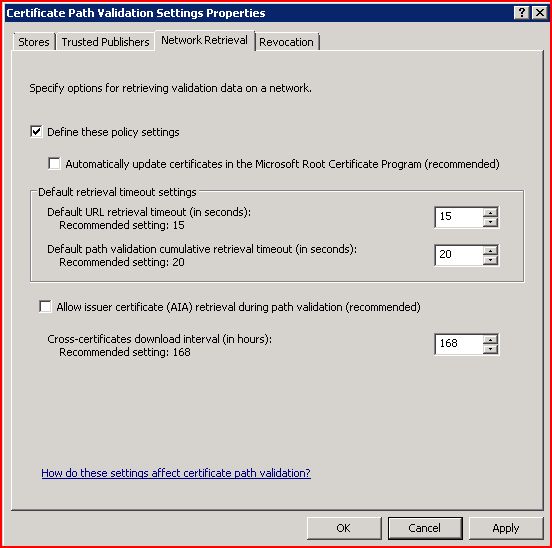
- Click on the "Network Retrieval" tab
- Check the box "Define these policy settings"
- Uncheck "Automatically update certificates in the Microsoft Root Certificate Program (recommended)" and "Allow issuer certificate (AIA) retrieval during path validation (recommended"
- Click on "OK"

Wednesday, September 26, 2012
“The install in progress conflicts with a previously installed Microsoft Office 2010 Server product”
This is one of the reasons I believe that there will never really be a renegade robot or software that will take over the world, Sarah Connor can go about a normal life.
With SharePoint 2010, installing, uninstalling, reinstalling, re-uninstalling is just so tempting at the slightest thought of problem. But you will get bitten a few times. Language Packs is one. Office Web Access is another. These guys can ruin your 5 minutes eternal coffee time.
Here is one example, see the screenshot:

I just yanked off an installation because someone in the team downloaded a custom code, and installed it in my dev environment. This killed my Central Admin one time. Every other site was working except my CA. SharePoint 2010 is tempting. I figured rather than looking for the problem, yank it off and reinstall after a proper backup. So, I uninstalled. I began re-installing and just after the product key page I got this.
This particular problem is caused by Language Pack. I had installed a French language pack because half my users are French speaking. So you can imagine.
SOLUTION:
1. Stop the installation.
2. Go to Control Panel --> Programs and Features
3. Identify the language pack for SharePoint
4. Uninstall
5. Reboot
Now you can proceed to install your SharePoint.
Friday, September 21, 2012
An Unhandled Exception 'system.security.cryptography.cryptographicexception' Occurred in OWSTIMER.EXE
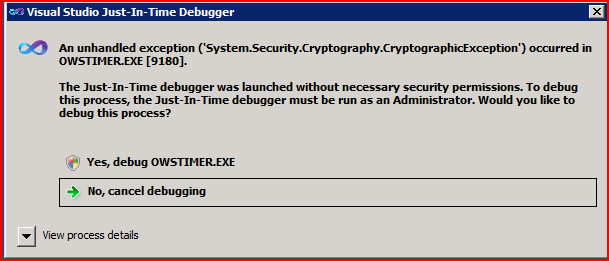
If this error was coming up perhaps when running some of my custom codes, and this debug suggestion comes up, then no problems, I can proceed and debug. Visual Studio is trying to help us out with an unhandled exception by asking about launching debug. That’s all well and good but I didn’t write the SharePoint code or the cumulative update code and so I have no plans to change it. So for as often as it pops up, is the same number of times you tell it to get da hell outta da way... :) :)
However, one way to work with this is to disable the JIT (Just-In-time Debugger) by following a few simple Registry Key changes: http://social.msdn.microsoft.com/Forums/en-US/vsdebug/thread/9e6cb3fb-f8fb-4c22-8608-e521e13260ff
Friday, March 18, 2011
I RECEIVED MICROSOFT MCC Award 2011

I was not very surprised when I got the Microsoft Community Contributor Award 2011, but I was excited to have been recognized with it. I knew Microsoft was aware of everything going on in the forums, but did not quite envisage that I would get something this valuable -- not in terms of money, but the resources (Microsoft Press E-Reference Library) that comes with the package! That's something to shout about!
The Microsoft Community Contributor Award seeks to recognize notable contributions to Microsoft online community forums such as TechNet, MSDN® and Answers. The value of these resources is greatly enhanced by participants who voluntarily contribute their time and energy to improve the online community experience for others. Each day around the world, Microsoft Community Contributor Award recipients contribute to Microsoft online technical communities in a range of ways, including providing helpful answers, translating online resources into local languages and serving as moderators.
Through the Microsoft® Community Contributor Award, Microsoft expresses their thanks to individuals who freely volunteer their time and energy to help improve the Microsoft online technical community experience for others.
More and more technology users are seeking ideas and solutions for enhancing their technology experience through online resources. At Microsoft, customers find answers when and where they want them through online forums such as TechNet, MSDN® and Answers.
Today, up to 4,000,000 people gain valuable information through Microsoft online forums–and that number is growing.
These valuable resources are enhanced by the contributions of Microsoft Community Contributor awardees, who help other participants in a range of ways, such as providing helpful answers, translating online resources into local languages and serving as moderators.”
Frequently Asked Questions
Q1. What is the Microsoft® Community Contributor Award?
A1. It is an award offered by Microsoft which is designed to recognize notable contributions to Microsoft online community forums such as TechNet, MSDN®, and Answers.Q2. Do Microsoft Community Contributor Award recipients represent Microsoft?
A2. No. Awardees are not Microsoft employees, nor do they speak on Microsoft's behalf. Awardees are independent third-party individuals who have received an award from Microsoft that recognizes their notable contributions to Microsoft online technical communities.Q3. How does Microsoft select recipients of the Microsoft Community Contributor Award?
A3. More and more technology users are seeking ideas and solutions for enhancing their technology experience through online resources. Microsoft reviews the contributions of participants who offer their time and energy to online technical communities such as Answers, MSDN and TechNet to identify those who make notable contributions for possible recognition as a Microsoft Community Contributor. In addition, Microsoft Community Contributors can be recommended by Microsoft Most Valuable Professionals, who serve as deep technical experts and thought leaders in the community.Q4. Do Microsoft Community Contributor Award recipients receive any payment from Microsoft?
A4. No. Recipients of the Microsoft Community Contributor Award receive a small benefit which can serve as a resource for their participation in technical forums, but they do not receive any monetary payment from Microsoft.Q5. What does Microsoft expect from Community Contributor Award recipients?
A5. Because the Microsoft Community Contributor Award is awarded based on past contributions, Microsoft has no expectations of awardees beyond the normal expectations of courtesy, professionalism, and adherence to the community rules that we ask of all Microsoft online community members. These rules can be found on the Microsoft Communities Rules of Conduct page.Q6. How long does the Microsoft Community Contributor Award last?
A6. One year from the date of the award, which can be found on the award notification email.Q7. How can I be considered for the Microsoft Community Contributor Award?
A7. Individuals are considered for the Microsoft Community Contributor Award by Microsoft, or as recommended by Microsoft Most Valuable Professionals, based on their contributions during the previous year to Microsoft online technical communities.Q8. Can I recommend someone to receive the Microsoft Community Contributor Award?
A8. No. Microsoft Community Contributor Award recipients are identified by Microsoft as a result of their notable contributions to Microsoft online community forums and can be recommended by Microsoft Most Valuable Professionals as part of their role as leaders in technical communities.Q9. Are Microsoft employees eligible to receive the Community Contributor Award?
A9. No, Microsoft employees cannot receive the Microsoft Community Contributor Award.Q10. Are Microsoft Most Valuable Professionals (MVPs) eligible to receive the Microsoft Community Contributor Award?
A10. No. Microsoft Most Valuable Professionals can recommend individuals for the Microsoft Community Contributor Award as part of their role as leaders in technical communities.Q11. Are there any requirements to receive the Microsoft Community Contributor Award?
A11. Yes, all Microsoft Community Contributor Awardees must be 18 years or older.Q12. Why must Microsoft Community Award Recipients be 18 years or older?
A12. Microsoft is committed to the safety and privacy of minors. Minors are defined as anyone who is not 18 years or older. To help ensure this safety, the Microsoft Community Contributor Award has a policy that all Microsoft Community Contributor Awardees confirm they are 18 years of age or older.Q13. How do I contact Microsoft about the Community Contributor Award?
A13. You can send questions to the Microsoft Community Contributor Global Administrator at MCCGA@Microsoft.com.Q14. How do I change or request a duplicate copy of my award benefits?
A14. Contact Microsoft Community Contributor Global Administrator at MCCGA@Microsoft.com.Q15. Do I have to pay for the Microsoft Press® E-Reference Library?
A15. No. As a Microsoft Community Contributor awardee, Microsoft is pleased to offer you a 12 month subscription to Microsoft Press E-Reference Library at no cost as our way of saying thank you for making a difference in Microsoft online technical communities.Q16. What is the Microsoft Press E-Reference Library?
A16. The Microsoft Press E-Reference Library, which is hosted by Safari® Books Online, contains over 400 books from Microsoft Press and offers you the most current technical information about Microsoft products in an easy-to-use online format.Q17. How do I sign up for the Microsoft Press E-Reference Library at no cost?
A17. As an awardee, you will be invited to accept the complimentary 12 month subscription to Microsoft Press E-Reference Library when you accept the Microsoft Community Contributor Award on www.microsoftcommunitycontributor.com. Simply check the box to confirm your acceptance of the Microsoft Press E-Reference Library and within three business days you will receive your log-on information directly from Safari Books Online. To ensure you receive your log-on information, safe list the sender noreply@safaribooksonline.com.Thank you MS!
Monday, January 24, 2011
DEALING WITH A LARGE TRANSACTION LOG FILE
Transaction log principles
Whenever a data update is made entries are added to the transaction log.
It is not possible to prevent this as it is part of the way sql server
maintains integrity - particularly during recovery. The transaction log is a circular file i.e. when the end is reached any
free entries at the start will be used.
This means that all being well the file will stay at a constant size as
the current entry cycles round.

The system maintains the MinLSN which is a pointer to the first active log
record.
Any log records before this (in the circular file) are free.
The MinLSN will be prevented from moving forward by any open transactions -
i.e. the oldest open transaction entry will be >= the MinLSN.
The MinLSN is updated at checkpoint so committing a transaction will not
immediately free entries and anything that holds up the checkpoint can cause
problems.

If the database is in simple recovery mode all entries prior to the MinLSN
will be freed at checkpoint.
If the database is in full recovery mode (and a full backup has been taken)
the entries prior to the MinLSN will only be freed by a transaction log
backup (not full backup).


Common cause of large transaction log file (.ldf)

Unfortunately the sql server default (except local editions) leaves the
databases in full recovery mode.
This menas that if no action is taken no tr log entries will be freed and
the log file will eventally fill the disk and crash the system.
The SQL Server installation process is very simple and commonly carried out
by inexperienced personel. This will appear to work happily but cause
problems later.
I would recommend always setting the model database to simple recovery
mode to set the default for new databases.


Stopping the transaction log file (.ldf) from growing

If the log file has grown do to being in full recovery mode then set it to
simple before going any further. This should immediately stop the log from
growing.
Enterprise manager
Right click on the database, properties, Options, set model to simple, OK.
t-sql
sp_dboption [dbname], 'trunc. log on chkpt.', 'true'
Shrinking the transaction log file (.ldf)
Before this make sure there are free entries by setting the recovery model
to simple or backing up the log. Enterprise manager Right click on the database, All tasks, Shrink database, Files, Select log
file, OK.

t-sql
dbcc shrinkfile ([db_log_name])
Here [db_log_name] is the logical name of the log file as found from
sp_helpdb or the table sysfiles
PROCEDURE


Shrinking the log file via detach/attach
Always take a full backup before a detach.

Detach the database, delete/rename the log file, attach the database -
this will create a minimum size log file.
Note that the log file must be deleted/renamed otherwise it will be
re-used even though it is not mentioned in the attach.

Enterprise manager
Right click on the database, All tasks, Detach database, OK.
Delete/rename the disk log file.
Right click on databases, All tasks, Attach database, Select the .mdf file,
OK, Yes (to the create new log message).

t-sql
sp_detach_db [dbname]
Delete/rename the disk log file.
sp_attach_single_file_db [dbname], [filename]
where [filename] is the name of the physical data file (.mdf).
Sunday, August 15, 2010
STREAMING VIDEOS
Anshul's SharePoint Blog for trackback purpose (it is one of many video solutions available for MOSS 2007.
As we all know that SharePoint 2007 can not play streaming Videos out-of-the box so i decided to find out a way by which you can stream videos on your MOSS 2007 site so i turned to my best friend... Google. I found a little material on the web where i came to know that to play streaming videos on the web you need a Streaming Server. So i decided to integrate SharePoint with a streaming Server. To play streaming videos Microsoft provides something called as Windows Media Services.Windows Media Services (WMS) is a streaming media server from Microsoft that allows an administrator to generate streaming media (audio/video). It is an update for Windows Server operating system. You can install it on your Windows Server 2003/2008 as a windows server role and then your server will be a Streaming Server.Ok so after this introduction to Windows Media Services (WMS) let us move ahead and look at the steps to integrate SharePoint with WMS.
Once Windows Media Services is Installed open the Windows Media Services Manager.
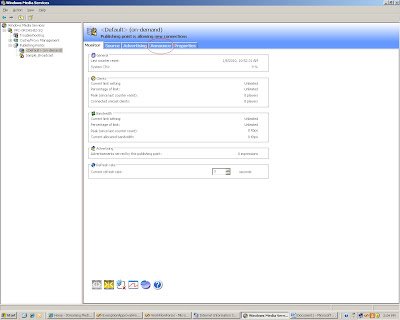
In the WMS Manager click the tab called Announce (using this you can create a Video Stream)
The media stream that WMS creates uses mms protocol the link that it will generate can be put directly in Windows Media Player to play the video stream but you can not store this link in SharePoint because the Link List in SharePoint only takes http protocol so we will run the Unicast Announcement Wizard which will create asx file which supports http protocol.

Clicking on the "Run Unicast Announcement Wizard" will start the Unicast Announcement Wizard. Click on Next

On the "On-Demand Directory" window click the browse button and select a video that you want to stream then click on Next


On the Access the Content Screen click on Next

On the Save Announcement Option screen select the path where you want to save the announcement. I decided to save the asx file on an IIS web site so that i can get an hhtp link to that file. So i created a simple IIS website called Media Services and gave its physical path as "C:\Inetpub\wwwroot\Media" and saved the asx file on the same path


On the Edit Announcement Metadata page you add metadata to the asx file and then click Next

On the Complete Announcement Wizard Page click Finish.

Till now we have a Video Stream created but now we need a Video Player web part to play this stream on the SharePoint site.
So the next step is to create Media Player Web part. I created a simple webpart which embeds the Windows Media Player on the SharePoint page and takes the source parameter of the Video dynamically from the query string. The following is the code for the Media Player Web Part.
using System;
using System.Collections.Generic;
using System.Linq;
using System.Text;
using System.Web;
using Microsoft.SharePoint;
using System.Web.UI.WebControls.WebParts;
using System.Web.UI;
namespace MediaPlayerWebPart
{
public class MediaPlayer : WebPart
{
private string videoPath = string.Empty;
[WebBrowsable(true), Personalizable(true), WebDisplayName("Video Path")]
public string VideoPath
{
get
{
return ((this.videoPath == null) ? string.Empty : this.videoPath);
}
set
{
this.videoPath = value;
}
}
private string width = "192";
[WebBrowsable(true), Personalizable(true), WebDisplayName("Width")]
public string Width
{
get
{
return ((this.width == null) ? string.Empty : this.width);
}
set
{
this.width = value;
}
}
private string height = "190";
[WebBrowsable(true), Personalizable(true), WebDisplayName("Height")]
public string Height
{
get
{
return ((this.height == null) ? string.Empty : this.height);
}
set
{
this.height = value;
}
}
protected override void CreateChildControls()
{
//if(Page.Request.QueryString["VideoPath"] != null || Page.Request.QueryString["VideoPath"] != string.Empty)
if (Page.Request.QueryString["VideoPath"] != null)
{
videoPath = Page.Request.QueryString["VideoPath"].ToString();
}
this.Controls.Add(new LiteralControl(" ");
}
Next.. create a Links List on a SharePoint site and add the link to the asx file that we just created.


Once all this is done add the Media Player Web Part and a List View Web Part showing the list of videos on a SharePoint Web Part Page. For this PoC I added a DataView web part of this Links list which displayed the Name of the Video as a hyperlink to the same page with the url of the Video as the query string so that the Media Player Web Part picks up the source of the Video from the Query string and plays the Video.

So here it is Video Streaming on SharePoint!!!
Now you can play videos from your Streaming Server directly on SharePoint
Friday, August 13, 2010
SIMPLE BACKUP AND RESTORE OPERATIONS
Here’s How It's Done
Source Server
Login to the source server and run the following command:stsadm -o backup -url "http://servername:port/sites/sitename" -filename "c:\foldername\sitename.bak"
This backs up the site to the specified destination folder.
Destination Server
Build out the destination server and run SharePoint configuration wizard, it is OK if you’ve already created a site collection on the target server because the new site will be overwritten by the -overwrite command below.Warning – When you build out the new server you should try to build it using the same version and install all of the same Application Templates and binaries that were on the original server.
stsadm -o restore -url "http://servername:port/sites/sitename" -filename c:\foldername\sitename.bak" -overwrite
If you access the site immediately after restore here’s what you’ll see (if you restored it to a new domain)

Add a user via command line because the restored site will deny all of your login attempts (unless your server is on the same domain as the original source server.
stsadm -o siteowner -url "http://servername:port/sites/sitename" -ownerlogin domain\accountname
OR
Using the Central Administration console, you will note that the site collection still references the original administrators which are now invalid on this new domain:
>> Central Administration >> Application Management >> Site Collection Administrators

Run the command below to change ownership:
stsadm -o siteowner -url "http://servername:port/sites/sitename" -ownerlogin domain\accountname

Now if you refresh Central Admin console you will see the new administrator as an owner, you can change the secondary administrator at this point as well.

Run the command below to add your new administrator to the site collection with the administrator role
stsadm -o adduser -url "http://servername:port/sites/sitename" -userlogin domain\accountname -useremail test@test.com -role administrator -username administrator

On the command prompt type IISRESET and execute.
Warning – Do not skip this step, you won’t be able to login until you run IISReset

Now you can refresh your main site and successfully login as the administrator.
Afterwards, you can optionally run this to clean up the old lingering logins explicitly
stsadm -o migrateuser -oldlogin olddomain\accountname -newlogin newdomain\accountname
That's all !